Pages

HW#3: Statics Lab write-up


Statics Lab
Balancing forces is something you will do in physics, statics, dynamics, and all of your mechanics classes. 


Statics Group Lab Write-Up:

I would like to give everyone some practice creating a lab write-up so that when it's time to put together your big project report you will be comfortable making a technical report.  Lab write-ups are something you will do in a lot of your classes - if you learn how to use all of the tools in word it will help you in all the classes you have to write reports in.

Technical writing notes:
 http://intro1201.blogspot.com/2015/01/chap-13-technical-communication.html

How to create numbered section headings in word -
just google which version of word you have!
https://www.youtube.com/watch?v=7X5-M6fsnCI

How to insert numbered equations in word -
https://www.youtube.com/watch?v=T34BMW7wxWI


You can turn this in as a group, but please find a time and place to sit down and work together on this (rather than just emailing one another) so that everyone understands how to do everything for the test.  Please indicate who worked on what section of the report.

Start report with a header:

ENGR 2301  Section _______________     Statics Lab                                  Date: __________

List Group members & their contribution:
Sarah Jane - set up excel tables and performed error analysis, created graphs and histograms
John Doe - Literature review, wrote intro and conclusions section
Harold Smith - Formatting and editing, created figure captions, numbered sections
Mathew Brown - Methods and procedures section, created diagrams, typed up equations in calculations section


Your reports and lab write-ups should all have numbered sections:

1. Introduction (10 points)
 5 points for lab objective & experiment description, 5 points for literature review
The objective of this lab is to determine ....

The experiment we performed was....

 Background information: We compared our results to ... (literature review) ... Smithson and Johnson reported that xyz [1] ← insert numbers that correspond to references in reference section at end of report. 

2. Methods and equipment (15 points)

2.1 List of materials used in experiment: (5 points)
1.
2.
3.

2.2 Procedure: (5 points)
1.
2.
3.


Figure 1: Diagram of apparatus used to measure the static coefficient of friction between various materials. (5 points)

How to insert figure captions in word:
https://www.youtube.com/watch?v=Te8bw_6lar0


3. Results (40 points) 

3.1 Calculations (15 points)

Use the word equations editor to add equations to your report. Show equations for how to calculate the coefficient of friction from inclination angle.  There are you tubes on how to use equation editor for all the different versions of word, just find and watch the instructions for the version you have.


 The equation should be numbered, and separated from text on either side with a blank line.  Show equations for calculating physical properties, as well as error analysis.

3.2 Graphs and Tables (15 points)
Graphs use numbered figure captions, tables use numbered table headings.  Be sure to include units, and an appropriate number of significant figures in your results.

To set sig figs in excel:
1. Highlight cells
2. Right click on cells
3. Select "format cells"
4. Select "Number"
5. Set number of decimal places
or

 For average, standard deviation - Use excel functions to check yourself, but understand what equations excel is using.  (ie, you should be able to write the equation for finding the standard deviation on a quiz or test, and use it.)


For most versions of excel - the arrow next to the "sum" key leads you to other functions like standard deviation etc.

Some example excel functions:
standard deviation = STDEV(C12:C14)
square root = SQRT(E15)
=AVERAGE(C12:C14)

Use excel "help" or online youtube tutorials to find what you need.  (You will always be dealing with different versions of software, so just get used to using online resources to find what you need to).

Tables have a header (Table 3.1... ABOVE table) - figures have a footer (figure 2.5 UNDER figure)


Figure 3.1 Bar graph of average inclines (in degrees) for various materials on a plastic mat.  All graphs should have a figure caption like this below them.
  • Discussion of results (10 points)
We think that our group's average differed from the class data because ....
The bald tire had a larger (smaller) coefficient of static friction because ....
Our results are only approximate because we assumed that ....

4. Conclusion (20 points)

Summarize findings, compare results to literature (site your references), provide recommendations for future experiments, and comment about results.


References (15 points):

How to add references in word:
https://www.youtube.com/watch?v=CnVq_BpwP2E

Your write-up should have at least 5-8 references. 

Points assigned based on:
  • Content - complete?  good discussion? 
  • Format & Writing style 
(References, no wordiness, specific descriptions, labeled headings, equations, figure captions, etc.)


Good resource for Friction/Tribology info:
explore the links within the text in the below article!
http://www.stle.org/files/About_STLE/Tribology/files/What_is_tribology/Tribology.aspx?hkey=99353e5d-423e-4d93-82f5-8ecaf56ece12


http://www.stle.org/files/What_is_tribology/Tribology_Friction.aspx


L3: Experimental Design


 Purpose of experimentation:
 - create higher quality products at lower cost.


What is an experiment?
Change in Input  → Process →  change in output

Process → machines, materials, methods, people, environment, measurements

What are the important input factors, and how do they influence the output?

1) Improve performance characteristics:
          Identify critical factors
          Reduce scrap and rework
2) Reduce costs

3) Shorten production development time


What is experimental design?
Using efficient and effective experimentation procedures to get the most information you can the fastest you can.
 
Most efficient way to collect data?
.
.
Use historical or happenstance data
AKA, just use what is already out there.
 
Risks – undocumented/unknown factors present in non-experimental data.
Example:  
Does changing temp in wire bonding process increase the number of defects in the product?
Undocumented factor: 
Lab operator was changing the standard temperature settings without recording altered temperatures.
.
.
.
Change one factor at a time.
example:
Hold Pressure constant, just change temperature. 


Hold temperature constant, just change pressure.


Do the above tables contain all possible combinations of (T,P)? 
No (P2,T1) is missing.
 
What about interactions between factors?
Example: Testing the effects of heart medication and grapefruit juice on health.  (Cannot test grapefruit juice independently of medication, as they interact with one another) 
 

If factors interact with one another,
one-at-a-time testing is inadequate to determine results.
Combination of (P2,T1) is not contained in the one-at-a-time tables.    What if (P2,T1) provides the optimal result?


Full Factorial Design
Test all possible combinations of input factors

-         Works well if there are only a few input factors
-         Impossible if there are many input factors


Example – what if there are 12 different input factors?

12 input factors, each tested at two different values


(T1, T2, P1, P2, % C1, %C2, etc.)


2^12 combinations = 4096 combinations to test! impossible!

Robust Design:

  • Eliminate testing factors that cannot be changed or controlled.
  • Use statistical tools to determine the most important combinations to test.
.
Planning your experiment:


State specific goals,
Example for our upcoming lab:
Determine:
  • influence of surface area on slip angle
  • influence of mass on slip angle
  • investigate interaction of different tire treads with different road surfaces


Meet with
  • Management,
  • engineers,
  • subject matter experts,
  • operators, 
  •  analysts


List inputs
  • mass  
  • surface area
  • tire type (bald tire, all-weather tire, bike tire, etc.)
  • road surface type (dirt, cement, ice, water, sand etc.) 
  • orientation of tire tread with road surface


List of outputs
  • coefficient of friction
  • Speed of slip (slow creep? fast slide?)


Objective:
  • Minimize slip between tire and all road surfaces
How will inputs be measured?
How many levels per input?  (Use mass 1, mass 2, mass 3 etc.?)
How important is each factor?
.
.


 *1.18 Tree diagram
*1.4 Design Matrix Table
Conducting the experiment:
  •  Adhere to clearly defined and agreed upon operating procedures
  • Prepare data sheets in advance ← Do this before our next lab!
  • Repetition & error tolerances
  • Analyze data, Draw conclusions, make predictions, do confirmatory tests
Causation vs. Correlation
 
  1. A causes B
  2. B causes A
  3. A and B are both consequences of the same cause
  4. Some combination of 1, 2, and 3
  5. A and B unrelated, correlation is pure coincidence.
http://www.fromquarkstoquasars.com/correlation-vs-causation/


First Lab:
  Test grip of different tire types on different road surfaces

Tires:
Road bike tire
Dirt bike tire
Bald car tire
All-weather car tire

Road surfaces:
Wood plank
plastic mat (slippery like ice)
welcome mat (rough like dirt road)

Mass:
Does the weight of the car matter?
add different weights to see effect on slip angle

Surface area:
Contact area between tire and road surface - does this change the slip angle?

Tread orientation:
skidding sideways vs. stopping straight on - does the orientation of the tire tread with the road surface make a difference?

**There are too many combinations and possible tests to complete all of them in one class period.  You will have to determine what questions are most important to you, then decide what data you need, and what combinations you will test.

** Error - you will need to test each combinations at least 3 times to test repeatability, and determine the uncertainty in your measurements.  We will go through standard deviation calculations, mean, mode, average, etc.

HW:  Consider how much time you have, then decide what factors you want to test, and create a data sheet in excel. 

Alternative experiment if you do not want to test tires - test different types of shoes! (Dress shoes, tennis shoes, sandals, slippers, etc.)


L4


ENGR1201 - we'll give you just a taste, or intro, to what you will be seeing in some of your other ENGRing classes.  As you try out labs from the different ENGR disciplines, think about what your top 3 choices are for what you want to major in.  Don't enjoy the lab? Then don't choose that ENGR major!  Like it?  Look into it more!  The point of this is to prepare you for other classes, and to help you decide what you want to major in. 

Intro (or Review) of Mechanics
(you'll see this stuff in physics too)

core classes/concepts for Mechanical, Civil/Structural, Metallurgical, ENGRing.

Classical Mechanics - behavior of objects subjected to forces.


Statics: 

The study of equilibrium, stationary (static!) systems subject to applied forces. 

Applications
- design of buildings


Design of bridges


Design of load bearing structures that are supposed to remain static and stationary.


Force: Push or Pull?

  • Body Force - distributed internally throughout a structure
  • Surface Force or Concentrated Force - force localized at a specific point.
  • Concurrent Force -  system of forces that can be represented by a single force
  • non-concurrent - force systems with parallel components that cannot be simplified into a single force.
  • Resultant Force - equivalent force of the total system - or vector sum of all the individual forces.   


Forces are represented by vectors (an arrow) with a defined orientation and direction - vectors can be 2D or 3D.

Vectors: Velocity, Acceleration, Force, position

Scalar: time, mass, volume, area


 Example
Find the resultant force


Rx = -100cos30° + 200cos45°+50 = 104.8
Ry = 100sin30°+200sin45°=191.4
R = SQRT(104.8^2 + 191.42^2) = 218.2

Just use your trig!


In 3D

 Rx = 200cos54.7° + 0 = 115.5
Ry = 200cos54.7° + 100cos45° = 186.3
Rz = 200cos54.7° + 100cos45° = 186.3


Moment:
rotation around an axis
M = Fd


d = perpendicular distance from the line of action to the force


See example 18.2 in book

Equilibrium
Summation of all the forces and moments is zero


Free Body Diagram


~~~~~~~~~~~~~~~~~~~~~~~~~~~~~~~~~~~~~~~~~~~~~~~~~~~~~~~~~~~~~~~~~~~~~
Statics lab: Find Static Frictional Coefficients - μs


Myth buster questions to investigate in lab:


#1: Is the max incline before slip really independent of mass? 


A great big truck - vs a little lightweight car - if they both have the same tires, they will both slide around the same?


.


Many people add sandbags to their car / truck in the winter to try and increase their traction - do sandbags help (if they have 4WD)?  Do they help on a flat road?  Do they help on a hill?


Myth buster question #2:  Is the angle of slip really independent of surface area????

Bald tire vs. new tire -

How dangerous is it to drive around with bald tires?  Is it really that important to keep getting new tires all the time?


 Road bike with skinny tires, vs. trail bike with fat tires - Why are there different bike (and car) tire designs based on what types of roads and trails you are on?  (Snow tires vs. regular tires) Compare tire performance on various surfaces - slick surface vs. rough surface. 


Other lab data -
Which shoes are safest for Granny to wear? 

Which gloves are the most slip resistant?


Taking Data in lab:
  • Repeat each measurement 4 times
  • Compare the data you get to the data other teams get - is it repeatable?  
  • What is the error in measurement? 


Uncertainty Analysis:  
Errors in Physical Measurements
  • X = True Value
  • xi = measured value
  • n = number of measurements taken
  • Accuracy = how close xi is to true value X
  • Precision = how good grouping is
Good accuracy poor precision -                                       Bad accuracy, good precision


 Mean:


  • Median = midpoint in events (½points below, ½ points above)
  • Mode = most frequently occurring value

  • Error = ei = Deviation from true value: ei = xi - X
    • We do not (and cannot) know X - so - Approximate X by the mean µ
    • ei* = xi - µ
    • ei* approximates ei and is called an estimator of ei.
    • Random deviations: Human errors, normal distribution
    • Systematic deviations: Calibration errors

  • Relative Error = DX/X -or- = ei/m
  • Variance


  • Standard Deviation = width of distribution, estimate of average error


  • Standard Deviation of Mean (SDOM)


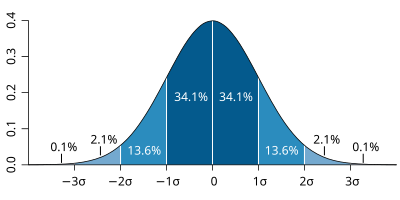
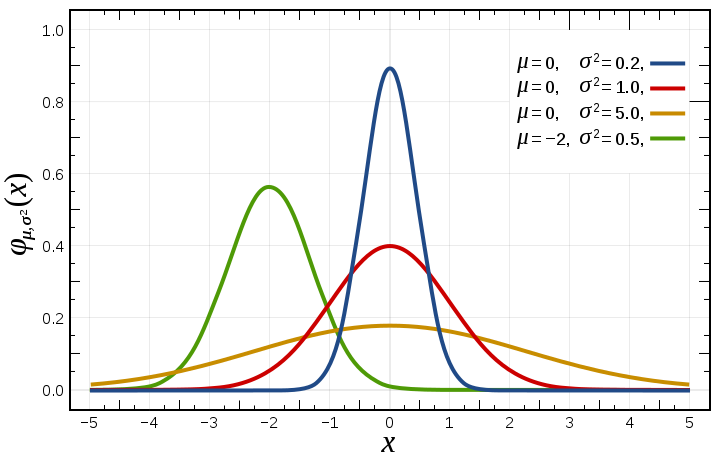
Gaussian (Normal) Distribution, or common probability distribution.  
(Take a bunch of data, probability that data will fall within a certain range)


Example of different distributions taken with different precision -


File:Standard deviation diagram.svg 
  • low standard deviation = data points very close to the mean
  •  high standard deviation = data points spread out over a large range of values.
File:Normal Distribution PDF.svg


HW#2: Set up an excel worksheet to take data in lab.
Create tables to record results.

Enter equations that calculate the friction coefficient from angles.
Enter equations to calculate the average and standard deviations of your lab results.

Collect background information, and research car and bike tire designs.
Make a hypothesis about what you will find in lab next week.

If you are not familiar with excel, watch some youtube tutorials on whatever version you have of it!  


Chap 13: Technical Communication

From "Writing as an Engineer" by David Beer and David McMurrey

 
Noise and the communication process:


Find the mistakes in the following sentences:

a.) When they bought the machine they weren’t aware of it’s shortcoming.

b.) There was not a sufficient enough number of samples to validate the data.

c.) Our intention is to implement the verification of the reliability of the system in the near future.


a.) The possessive form of it = its
it's = it is
Example:
     It's raining today. (It is raining today)
     The dog wagged its tail.

b.) Redundant and wordy: 
There was insufficient samples to validate the data.

c.)   Wordy
We want to verify the system’s reliability soon. 

Focus on:
 
 - Why you are writing.

  • to inform, request, instruct, propose, recommend, persuade, record?

- Who are your readers?
  • Fellow engineers from your field?
  • Engineers from a different field?
  • Managers? Marketing?
  • Mixed audience?

Are you communicating technical information on a level your audience can use?   

Are you using appropriate vocabulary, examples, definitions, and depth of detail? 

Satisfy Document Specifications
- Adhere to suggested length.
- Format spec’s: headings, spacing, margin widths, font


Get to the Point
  • Put important info first.
  • Intro - briefly state key points, complaints, requests, and conclusions.  
  •  Do not include details until the body of the text. 

 Accuracy
  • Accurate references
  • Accurate directions and instructions
  • clearly state the conditions your data is applicable to. 
  • Do not state opinions as facts.


Logical Presentation and organization:


  • Numbered sections and subsections with titles.
  • Organize in levels of detail and importance
    • main subject first
    • fill in the details later  
  • First level headings should be in large font 
  • separate headings from text by one line
  • indent minor headings


Use Lists

 
Lists are often the most efficient way to communicate information.


List material from most important to least important


3 types of lists:

  • numbered (or lettered) for procedures, or prioritized lists
  • checklists – for things you need to do
  • bullet lists – items in list occur in no specific order

Be Clear & to the point:
  Ambiguity – comes from the Latin word meaning to be undecided, causes readers to see more than one meaning in your writing without knowing which is correct.   

Avoid words like “they” and “it” to be specific and avoid ambiguity.


Ex: 
Ambiguous:
 Before accepting materials from the new subcontractors, we should make sure they meet our requirements.

Who are “they”?  the materials? Or the contractors? or both?


Clear:  We should make sure the materials from the new subcontractors meet our requirements before we accept them. 


Ambiguous: The microprocessor interfaced directly with the 7055 RAM chip.  It runs at 5 MHz. (What does “it” refer to?)

Clear:
   The microprocessor interfaced directly with the 7055 RAM chip.  The 7055 runs at 5 MHz.
 

Vague – contains no useful information.

Example:
“Take a few of these pills every so often.”  How many pills?  How often?


Vague: The Robotics group is several weeks behind schedule. 
Useful
: The Robotics group is six weeks behind schedule.


Vague: The CF553 runs faster than the RG562 but is much more expensive.
Useful: The CF553 runs 84% faster than the RG562 but costs $4,320 - $2,840 more than the CF553.


Coherence – comes from the word “cohere” or stick together.

Clear transitions – use words like “because”, “this shows”, “in addition”, “thus” to link sentences to one another.
Use a clear subject for each paragraph
Everything should support the subject of report


Directness:
Avoid suspense.

Put the most important information first.
 

example:

 Indirect: After a long and difficult development cycle due to factory renovation, the infrared controller will be ready for production in the very near future. 
Direct: The infrared controller will be ready for production March 4.  Its development cycle was slowed by the factory renovation. 


Avoid wordiness
Avoid unnecessarily pompous or ostentatious & showy words.  The point of technical documents is to convey information, not to make yourself look smart.

keep it simple and straightforward.

Remember, often your readers have English as their second language.
 

pompous  - straightforward
Commence – start
Compel – force
Comprises – is
Employ – use
Endeavor – try
Fabricate – make
Finalize – end
Initiate – begin
Optimal – best
Prioritize – rank
Proceed – go


Wordy: I regret to say that at this point in time I basically do not have access to that specific information…
Clear:  “I don’t know.” 


Wordy – efficient
A large number of – many
At this point in time – now
Come in contact with – contact
Exhibits the ability to – can
In the event of – if
In some cases – sometimes
In the majority of instances – usually

Redundancy 
using multiple words to say the same thing
 

Redundant – clear
Alternative choices – alternatives
Actual experience – experience
Completely eliminate – eliminate
Connected together – connected
Collaborate together – collaborate
Very best – best
Component part – just say either “component” or “part”not both

Turning verbs into nouns:
Write in an active voice (rather than passive) by using verbs instead of nouns.
 

wordy – clear
An analysis of the data – analyze
An investigation of xyz – xyz was investigated.
made a selection – select
Procurement of services can be accomplished by – services can be procured by

Paragraph Length:
Avoid walls of words
rule of thumb – keep paragraphs to under 12 lines
Most paragraphs will be much shorter.  (one liners are just fine)


Formatting

Margins – Use large margins to prevent pages looking too busy

Typeface – 10 to 12 point, Times New Roman, Arial

Use ample “white Space” around figures, headings, paragraphs, equations, & lists


Manage your time
Create and use a schedule
Give yourself time to edit
Team: divide and conquer, assign different sections to different people, but then have one person organize, and re-write it to create a smoothly flowing document (rather than a patchwork quilt of different writing styles) 

Graphics & Charts –
use numbered figure captions,
refer to the figure in the text by the number.

Tables
include a table heading.  Heading go above tables (figure captions go below figures) 


Report


References 
Should be numbered at the end of the report, and referred to in the text by their number.


Presentation Checklist:


~~~~~~~~~~~~~~~~~~~~~~~~~~~~~~~~~
You will probably end up taking an entire class on technical writing.  Start getting used to it now,  by the end of the semester you should be able to put together a good technical report!  


Learn how to add numbered footnotes - (google it if you don't know how)


  • Use Headings - bold, numbered, underlined


  • Use bullet lists and numbered procedures instead of long paragraphs.

  •   Use figure captions.  Refer to figures in the text.
    • Tables have headings
    • Diagrams have captions
Just look in any ENGR textbook and notice how everything is formatted.
 
Use consistent format through entire report 
  • If different people write different sections, make sure when you put it all together it looks like one single report written by one single person.
Don't plagiarize!   
  • Warning - I do random google checks on what you have written. Cite your references, use small quotes if you need to, but most of the report should be in your own words.
Pay attention to simple grammar and spelling!

Eye halve a spelling chequer
It came with my pea sea
It plainly marques four my revue
Miss steaks eye kin knot sea.

Read what you have written out loud 
  • if it sounds strange when you hear it, then fix it.
Read through the work of your team.   
  • Pay them $0.25 for every mistake they find in your work.
Presentations  
  • Practice with one another
  • practice in an empty room
Videotape yourself, watch yourself, and fix what you see. 
 Pay attention to people who impress you, - copy their techniques.


Use the LSC writing center!!  
LIB 219
http://www.lonestar.edu/lsc-kingwood-tutoring.htm