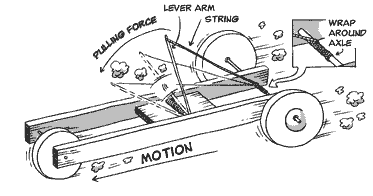
Car that goes the longest distance does not have to take the final!
Rules:
Work on them individually, or in groups of two - if you work in groups, you split the reward if you win (ie - each person gets 50 extra points on final)
Use one mousetrap to propel the car - (do not add electric motors etc. - your car can only be propelled by the mousetrap spring)
Bring a video camera to record your run (phone)
You will use the video to record x(t) to calculate velocities and accelerations from.
Grade: 1. Distance traveled (25 points) 4 points / ft scores above 25 points get you extra credit
0-1 ft→ 4 points
1-2 ft → 8 points
2-3 ft → 12 points
3-4 ft → 16 points
4-5 ft → 20 points
5-6 ft → 24 points
6-7 ft → 28 points! (25 + 3 Extra credit)
2. Travels in a straight line (20 points) score = 20 - 10*(Distance from center line / distance traveled)
Strength & functionality: 10 points Robust Design that doesn't fall apart? Smooth operation of parts? Aesthetic appeal & creativity: 10 points 4. Top speed (25 points) top 33% in class - 25 points middle - 20 points bottom 33% - 15 points Tips: Lightweight cars typically go faster & farther. Do a google image search to see designs. Make wheels out of:
old CD's
Records (you can get these at 1/2 priced books for ~ $1.00)
Lids from plastic food containers
old toy car wheels
We'll test them on the tile surface downstairs so you will need some kind of traction for your wheels:
Wrap a rubber band, balloon, or other rubber material around your wheel.
Prior to race-day we will be: - going through some dynamics concepts - setting up excel spreadsheets for the data - going through error propagation examples Dynamics lab: You will only need to write up the results section of this lab report, which includes:
8 essential parts: 1. Case, Monitor, Keyboard, Mouse - peripherals case: box around all the parts
- easy to open up -large enough to fit everything into it - large exhaust fans - compatible with motherboard
Monitor:
consider size(23", 27", larger?)
resolution (how many pixels it displays - how sharp the image is)
one monitor or two?
Keyboard:
Mouse:
Considerations:
Ergonomics! Make sure you are comfortable using it.
Scroll options
Wired vs. wireless
2. Power Supply: Provides power to motherboard and expansion slots. - adequate wattage
- modular plugs - manage cables Fan - heat management.
3. Motherboard:
Ties all the parts of the computer together - ties together processor, memory, power supply, video cards, keyboard, mouse, sound, monitor etc.
-AGP - Accelerated Graphics Port channel for attaching a video card -RAM - Random Access memory - temporary data storage that can be accessed in any random order. Temporary - is gone if you shut the computer down (if you did not save your work, and the computer shuts down, it will be gone because it was only in RAM.)
- ROM - read-only memory. Permanently stored data. ROM stores your computer's configuration is and is necessary to boot the operating system.
-PCI - Peripheral Component Interconnect – attach hardware devices like network cards, sound cards, modems etc. -ISA Industry Standard Architecture IBM computer bus - Bios Basic Input/Output system, or basic integrated operating system, performs basic functions like booting and keyboard control.
- CMOS battery – stores the system time and CMOS BIOS settings when computer is off (Complementary metal oxide semiconductor) -EIDE - Enhanced integrated drive electronics, or ATA storage device connector, like hard disks & floppy drives -CPU - Central Processing Unit
PCI express - Peripheral Component Interconnect Express serial expansion bus
SATA - Serial ATA (Advanced Technology Attachment) bus interface that connects bus adapters to storage devices like hard disk drives and optical drives. ATX - default form factor, full-size ATX board is 12 × 9.6 in (305 × 244 mm). DDR - double data rate RAM - high transfer rates
HDMI (High-Definition Multimedia Interface) audio/video interface for transferring uncompressed video data
4. CPU - central processing unit, hardware in computer that performs input/output operations, decodes, and performs calculations.
Multiprocessing - more than one CPU Multi-core processors - multiple CPU's on single chip
located next to big fan, most expensive part of computer
Intel - LGA (land grid array) socket, no pins, just gold contacts
AMD - pins
Fan - important to keep CPU from overheating!!
5. Memory DIMM - dual in-line memory module, series of dynamic random-access memory integrated circuits.
RAM - Random Access Memory temporary memory that only works when the computer is on, then it is flushed out.
6. Video Card DVI - Digital Visual Interface
Discrete video card - separate from what you get on motherboard
PCI (Express) - Peripheral Component Interconnect, serial computer expansion bus
serial communication sends data one bit at a time, sequentially, over a communication channel or computer bus.
parallel communication, several bits are sent as a whole, on a link with several parallel channels.
7. Storage (HDD/SSD) - AKA hard drive Permanent memory storage (does not disappear when computer is turned off, like RAM/DIMM) Mechanical hard drive. Two different types:
HDD - hard disk drive -uses rapidly rotating "hard" disks coated with magnetic material. Magnetic heads arranged on a moving actuator arm read and write data to the surfaces. Data is read in a random-access manner, meaning individual blocks of data can be stored or retrieved in any order rather than sequentially.
SSD - solid-state drive/solid-state disk
- no moving parts, no actual "disk" of any kind, - no motors to "drive" the disks, - - data storage device using integrated circuit assemblies as memory to permanently store data - fast and quiet
8. Optical Drive reads and writes to CD's, DVD, and Blue Ray disks. CD - "compact disk", originally created for music, expanded for use with storing data.
CD-ROM: Read-Only Memory
CD-R - "Recordable" is a Write Once Read Many (WORM) optical medium
CD-RW "re-written"
DVD "Digital Video Disc" or "Digital Versatile Disc", originally for videos, expanded for use with music and other data. Blue Ray - can store video and audio with greater definition I/O (Input Output) keyboard, mouse, USB, Printer, Monitor etc.
BIOS - Basic input output system for loading UEFI - Unified Extensible Firmware Interface replace BIOS in newer computers, interface between OS and firmware. OS - Operating System - software that manages hardware resources - links programs with hardware. (UNIX, Solaris, Linux, Mac OS X, Microsoft Windows)
The purpose of this lab is to familiarize you with the major components of a personal computer. I want you to “build” a personal computer by selecting components you find on the web. List the details for each component as described below. Make sure that the components you choose work together and that the power supply you choose is adequate for your power budget. For this lab, assume heat issues have been mitigated with appropriate cooling techniques.
Motherboard: ________
Cost:
Size/Form Factor: ________(Mini ITX, Micro ATX, or full ATX, determines size of case)
Ports: ________(USB ports?HDMI?)
Chipset: (manages the data flow between the processor, memory and peripherals:,
northbridge links the CPU to very high-speed devices, especially RAM and graphics controllers, and the southbridge connects to lower-speed peripheral buses (such as PCI or ISA, Ethernet, USB, and audio devices
Socket: (determines which CPU you can use, LGA socket = no pins. AMD - pins)
Manufacturer: (ASUS, GIGABYTE, and MSI...BIOSTAR, ASRock etc.)
Website:
CPU:
Cost:
Cores: __ (more cores means it can carry out more sets of instructions at one time)
Clock Speed: (how many instructions one core can carry out in one second)
Cache: (speeds up the memory retrieval process)
Manufacturer: (AMD - less expensive, Intel - performs better)
Website:
RAM: (check what your motherboard supports!)
Cost:
Size: (average ~ 4GB)
Speed:
Memory Type: (static RAM (SRAM)- more $/faster/less energy; dynamic RAM (DRAM) - most common, and phase-change memory (PRAM), DDR3- double data rate type three with DRAM interface)
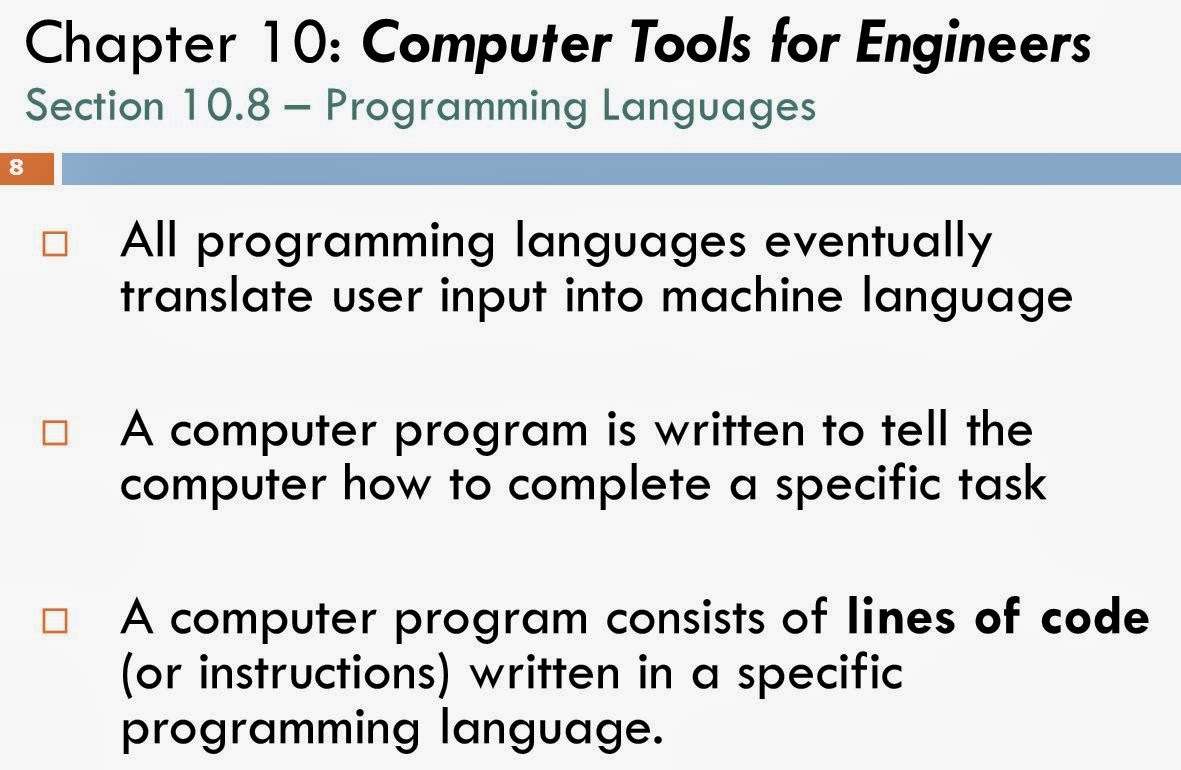
A compiler is a computer program (or set of programs) that transforms source code written in a programming language (the source language) into another computer language (the target language, often having a binary form known as object code).
linker:
Program that links to the libraries needed for an executable program.
10.7 Operating systems Operating system - interface between computer hardware (monitor, mouse, physical devices), software (programs), and user (you!).
second line of code – new_value – “fetches” the variable “value”, the log function is “decoded” and then the function log(value) is “executed”.
Object-Oriented Languages: C++, Java data and routines that act on data treated as “objects”.
Value =5 new_value = log(Value)
“value” and “log” are treated as one single object, that, when called, automatically takes the log of value.
object = reusable, modular software component
FORTRAN(77, 90, 95) – Formula translating System, IBM, John Backus – 1957, higher-level programming language that uses English instead of just symbols. Libraries of FORTRAN codes: IMSL (International Mathematics and statistics Library) NAG (Numerical Algorithm group) . BASIC – Beginner’s All-Purpose Symbolic Instruction Code – 1964 at Dartmouth by John Kemeny & Kurtz – to encourage more students to use computers by offering a more user friendly, easy-to-learn language. . Pascal – 1971 – also developed for educational purposes by Prf. Wirth (not used much outside of schools) . C – 1972 – by Dennis Ritchie of AT&T Bell Labs, outgrowth of BCPL & B languages. . UNIX – also based off B language. . ANSI C – common industrial language. . Java – by James Gosling of Sun Microsystems small, fast, reliable, transportable program software for TV’s, VCR’s, telephones, etc. Java applications – word processors, spreadsheets Java applets – stored on remote computers, accessed through web. . HTML - HyperText Markup Language code for webpage. use tags: <TITLE> ... </TITLE> <P> - paragraph <H2>Second level heading</h2> <ADDRESS> text ... </ADDRESS> - sigs, italic and/or right justified or indented To see the HTML code used to create the Web page - Click on "View" in the menu bar and then click "Page Source."
C&C++ are among the world's most popular programming languages. If you want C++ on your home personal computer, you can download it for free:
check that the compiler setup is working correctly
teach new users simple syntax& program structure
Open C++
•Start,
•All Programs,
•Microsoft Visual Studio,• Microsoft Visual C++ 2015 Express
New Project:
Win32 Console Application
Choose Console App with Precompiled header
Enter a name for your program, etc.
Opening screen:
Click the green arrow to run the precompiled header and see if everything is linking correctly.
If you get it to compile, you can then delete the header, and replace the program with the programs below.
If you have an older version of Visual Studio:
File →New→Project
→Win32 Console Application → enter a name for your project "Hello World" → ok→ next
→ select "" and "" →Finish
You should now have a page that look like this:
•Click the green arrow at the top to run the precompiled header
Would you like to build it?Yes
•Did you get a lnk error message? (applies to older versions of VS)
•Google the error message – see how to fix it:
•Click the green arrow again,
Is the error message gone now?
Copy the following code into C++:
// Hello World.cpp : this is the comment line where you can tell users what your program does. This program will output "Hello World" //
#include "StdAfx.h" #include "iostream" using namespace std; int main () { cout <<"Hello World"<<endl; system("PAUSE"); return 0; }
***Note - C++ is picky, it is case sensitive, you have to be very careful to get everything typed in correctly.
Click the green arrow, would you like to build it? → yes
The program should then execute, a new window will pop up and say "Hello world"
What is in your program?
#include "StdAfx.h"
#include "iostream"
include instructs the pre-processor to include another file (the file StdAfx.h, and iostream or in out stream in this case)
iostream - input and output program, lets you use "cin" and "cout" to allow a user to imput data into the program, and for the program to output data back to the user. StdAfx.h namespace, reduces compile & processing time - http://www.cplusplus.com/articles/1TUq5Di1/
int main () the first function, where the program actually begins.
{} Surrounds the function { start end}
cout <<"Hello World"<<endl; Outputs "Hello World" to the user ; C++ syntax, ends the command system("PAUSE"); Pauses the screen
return 0;indicates that the main function has ended
Functions provides a way of grouping commands together under a logical heading which can be called from a single line within your main program (no point rewriting and rewriting hundreds of lines of code every time you want a specific function – so get thousands of lines of code into one line of command)
Library file – collection of resources used in your computer program, allows sharing and importing of resources across one or more computers, to use and reuse as often as you wish. You can write your own, or use existing files created by C++. – use library files instead of having to code everything yourself, just “include” them into your program.
Open source – software whose source code is available free of charge to the public to use, copy, modify, etc. Preprocessor commands, command after # symbol, like #include – another separate program invoked by the compiler which includes extra source code definitions. Include allows you to load separate source codes into your system.
Editor – what you type your code in (like a notepad)
compiler – root of any programming language, transforms source code into assembly language or machine code, without it all you have is a block of text that doesn’t do anything.
Object – entity which can be manipulated – variables, functions, data structures, & classes
stream – input output channel linked to the console
overload – if an operator has more than one meaning, example: << inserts data into the cout stream instead of being a left shift.
Commenting // HW.cpp : Defines the entry point for the console application.
//
leave notes for other programmers who are looking at your code – text that is not part of the code itself, just explains what code does.
// airplane program! #include <stdio.h> #include "StdAfx.h" #include "iostream" using namespace std; int main() { int count; for (count = 1; count <= 500; count++) cout <<"I will not throw paper airplanes in class." << endl; system("PAUSE"); return 0; } ~~~~~~~~~~~~~~~~~~~~~~~~~~~~~~~~~~~ Assignment #1 This age calculator compiles, but does not calculate the correct age.
1. Study the program to see what it does.
2. Change the equations in the if statements so that it correctly calculates someone's age. 3. Add if statements below all of the inputs that check to see if the input is legitimate, and then sends an error message if it is not. Example - if someone enters a birth year of 10, cout << "please enter the birth year as a 4 digit number such as 2010"<< endl; and then ask again for the birth year etc. 4. Extra Credit: Add a cout that gives an age appropriate comment, such as "Wow, you are really old!", or "You're just a young'n!"
// Age Calc.cpp : Program to calculate someone's exact age. // #include "stdafx.h" #include <iostream> #include <conio.h> #include <time.h> using namespace std; int main() { int birthmonth, birthyear; int currentmonth, currentyear; int agey, agem; cout << "\n\n\t\t\t Age Calculator\n\n"; cout << "Enter Your Birth Year(Eg:1989):"; cin >> birthyear; cout << "\n\nEnter Your Birth Month(Eg:7):"; cin >> birthmonth; if (birthmonth > 12 || birthmonth < 1) return 1; cout << "\nEnter The Current Month(Eg:7):"; cin >> currentmonth; cout << "\nEnter The Current Year(Eg:2010):"; cin >> currentyear; //if(birthmonth > currentmonth) you have not had your birthday yet if (currentmonth>birthmonth) {agey = currentyear - birthyear; agem = 12 - birthmonth;} // if(birthmonth < currentmonth) then you have had your birthday else if (currentmonth<birthmonth) {agey = currentyear - birthyear; agem = 12 - birthmonth;} // if(birthmonth =currentmonth) write Happy Birthday!!! else {agey = currentyear - birthyear; agem = currentmonth - birthmonth; cout << "\n\n\t\t~~**HaPpY BiRtHdAy **~~ ";} cout << "\n\n\t\tYour Age is " << agey << " Years And " << agem << " Months "; _getch(); return 0; }
~~~~~~~~~~~~~~~~~~~~~~~
~~~~~~~~~~~~~~~~~~~~~~~~~~~~~~~~~~~~~ Test your program:
Jack - born Jan 2005 (Already had his birthday this year - 9 years, and 2 months
Jill - born Sept 2006, (She has not had her birthday yet, 7 years, 6 months) Test one for someone who has their birthday today
Excercise #2 Modify the below program to write out the Fibonacci series using a for loop:
Just replace "????" with what it needs to be!
~~~~~~~~~~~~~~~~~~~~~~~~~~~~~~~~ #include "stdafx.h" #include <iostream> #include <conio.h> using namespace std; int main() { int n, a = 0, b = 1, c, count; cout << "Enter the number of terms of Fibonacci series you want:"; cin >> n; cout << "1" << "\n"; for (count = 0; count <= n; count++) { c = a + b; a = ??; b = ???; cout << c << "\n"; } system("PAUSE"); return 0; }
Exercise #3
Write a program that calculate the coefficient of friction & forces acting upon an object at rest on an inclined plane.
Input: m, theta Output: u, Fn, Ff
#include <math.h>
// lets you use cos() sin() etc.//
#define GRAV 9.8
#define PI 3.141592654
Excercise #4 - your choice!
Write a program that calculate the voltage drops and current in a simple series circuit.
Input: V, R1, R2, R3 Output: i, V1, V2, V3
or - write a program for your group project - write an ENGR1201 grade calculator *clac what grade you need on the final to get an A in class considering what you have so far - write a calorie counter * output how many miles you need to run in order to use up the food you just ate - write any program you want that: *asks for user imput * performs a calculation based on that input * outputs something based on the calculation ~~~